今天親自打電話給微軟客服詢問授權
我們的CASE是要在Windows Server上執行IIS服務,無限制瀏覽使用者,公司內部、一般使用者皆可瀏覽;有會員系統,會員系統的認證是在網頁內進行,無須透過外部系統認證。
經詢問之後,客服表示我們必須買足CAL (Client Access License) 數量(公司人數)以及External Connector (EC)授權
與底下連結文章的說法不同,目前客服是說微軟2015有新規定,而底下文章發表日期是2014。
https://blogs.technet.microsoft.com/volume-licensing/2014/03/10/licensing-how-to-when-do-i-need-a-client-access-license-cal/
公司若有兩套Windows Server,不需要重複購買CAL,以及,SQL Server的CAL與Windows Server的CAL不同,SQL Server的貴多了。
如果網站後台是使用SQL Server,則SQL Server也須購買同等人數CAL,或者改採用CPU授權模式。
如果公司人數50人,Windows Server 2016盒裝近5萬塊,
Windows Server CAL牌價1380,1380*50 = 69,000
EC牌價約70,000
則Windows Server 2016架網站需要 50000+69000+70000 = 189,000
如果後端要用SQL Server 2017,採用CPU計價(CAL不划算),牌價約217,240 (至少要購買2 Cores)
因此總價約406,240元(這是牌價)
真不是小公司能玩的....
2018年1月30日 星期二

2017年9月28日 星期四
為文字上Highlight,但是排除HTML Tag內容,並且保持文字大小寫
(?!<[^>]*?)"+Pattern.quote(search)+"(?![^<]*?>)
text = text.replaceAll("(?!<[^>]*?)("+Pattern.quote(search)+")(?![^<]*?>)", "<span style='display:inline; background-color: yellow;'>$1</span>");
2017年3月7日 星期二
[心得] 台灣大哥大 網路漫遊預付卡 日本北海道4G無線上網吃到飽 (有網路測試圖)
我與老婆基本上都算得上重度上網族群,為了今年二月能夠跟老婆有一個高品質的北海道蜜月之旅,上網研究了很久的網路漫遊,大致上比較了幾家的優缺點,最後我們選擇了台灣大哥大網路漫遊預付卡,最後也證明了我們的選擇沒錯! 希望PO出來能夠對大家有一點幫助。
2015年4月8日 星期三
Let your PHP calls JAR of JAVA (Windows)
Set the identity of executor for Apache
Before run your php program.You have to set the identity of executor for Apache.
- Go to "Service"

- Change the executor (use your log-in account)

Write a toy program
// Set Enviromental Variable$JAVA_HOME = "C:\\\"Program Files\"\\Java\\\"jre1.8.0_20";
$PATH = "C:\\\"Program Files\"\\Java\\\"jre1.8.0_20\"\\bin";
putenv("JAVA_HOME=$JAVA_HOME");
putenv("PATH=$PATH");
//run your jar program
echo shell_exec("java.exe -version 2>x.txt");
Finally, execute PHP program
2014年4月7日 星期一
MySQL利用console介面匯出/匯入資料
匯出:
可以利用mysqldump來達到匯出
可以利用mysqldump來達到匯出
mysqldump -u root -p 資料庫名稱 資料表名稱 < 要存成的檔案名稱 (xx.sql)如果是遠端的資料庫,可以加"-h IP位置"
如果遇到command denied.....when using LOCK TABLES,代表可能是因為權限不足(無法鎖定table)
可以在最後面再加上一個參數--skip-lock-tables或--skip-add-locks
另外,可以使用 --default-character-set=UTF8 來指定編碼
匯入:
登入MySQL之後,選好資料庫(use 資料庫名稱;)
輸入source c:\xxx\ooo\xx.sql; 即可開始匯入
2013年11月19日 星期二
Don't assign an array type value to URLOPT_POSTFIELDS in curl
If you are not planing to upload a file, don't to assign an array type value to URLOPT_POSTFIELDS in curl.
Today, I got a problem about using curl to do a login action.
Something happened. The system didn't work because the first character in the password was a @ character.
See the reference: http://php.net/manual/en/function.curl-setopt.php , and please find the statement of CURLOPT_POSTFIELDS section.
You will find a statement as following:
If value is an array, the Content-Type header will be set to multipart/form-data. As of PHP 5.2.0, value must be an array if files are passed to this option with the @ prefix. As of PHP 5.5.0, the @ prefix is deprecated and files can be sent using CURLFile.
So, you/me should use String type rather than Array type assigning values to URLOPT_POSTFIELDS if you aren't planing to upload a file.
The solution can be found in this web page: http://www.brandonchecketts.com/archives/array-versus-string-in-curlopt_postfields
Hope it also help you.
Today, I got a problem about using curl to do a login action.
Something happened. The system didn't work because the first character in the password was a @ character.
See the reference: http://php.net/manual/en/function.curl-setopt.php , and please find the statement of CURLOPT_POSTFIELDS section.
You will find a statement as following:
If value is an array, the Content-Type header will be set to multipart/form-data. As of PHP 5.2.0, value must be an array if files are passed to this option with the @ prefix. As of PHP 5.5.0, the @ prefix is deprecated and files can be sent using CURLFile.
So, you/me should use String type rather than Array type assigning values to URLOPT_POSTFIELDS if you aren't planing to upload a file.
The solution can be found in this web page: http://www.brandonchecketts.com/archives/array-versus-string-in-curlopt_postfields
Hope it also help you.
2013年10月6日 星期日
Buy a prepaid phone from SoftBank online shop
Finally,
I got my phone and completed the setting.
Actually,
I do not even speak Japanese.
In
most situations, I used the google translator to translate SoftBank's
web...
There
are some conditions here for the people who would like to buy a prepaid
phone.
If
you would like to a prepaid phone in Japan, you have to satisfy some
conditions as follows:
- You have your own resident
card.
- The resident card have
filled out your residence address.
- Find a SoftBank shop that
sells prepaid phone and prepaid sim card OR buy them form SoftBank online shop. (
- If you want to only buy a
prepaid sim card, you have already had a SoftBank Phone, which had
not contracted currently.
- Most of the SoftBank
shops do not sell the prepaid phone.
- Most of the SoftBank
shops do not provide English service.
- If you are like me bought
the phone from online shop, you have to carefully fill out your order information.
- Your residence address in
the order have to identical to the address in your resident card.
Any different is not allowed. If any different here, SoftBank
will ask you to contact him by using a call for checking your information
(some people told me they provided English in their toll-free number).
- You have to use a credit
card for payment.
- You have also to upload
or mail a copy of your resident card (two sides) and your passport.
- After you gotten your
prepaid phone, you have to activate your prepaid sim card.
Otherwise, the prepaid sim card will be out of
service.
- There is the address for
activating prepaid sim card: http://online-shop.mb.softbank.jp/ols/html/manual/explanation/setting_pri.html.
- In the process, you have
to fill out the application number, your email, and a password (4 numbers
set by you)
- Finally, you can login
SoftBank web site to register your phone.
- You can use your credit
card to recharge: http://mb.softbank.jp/en/prepaid_service/recharge/credit_card.html
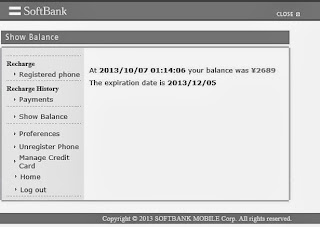
- You can also check the
expired time and balance in the web side. It is very important to me
because I do not understand what they say in the 1400 call.

Finally,
I apologize for my bad English.
訂閱:
文章 (Atom)